
How to Automate Repetitive Coding Tasks with Verdent Manager
What Counts as Repetitive in a Developer's Day
Repetitive coding tasks share a pattern: they require codebase context, follow a predictable sequence, and recur on a schedule or trigger. They are not complex enough to justify a dedicated CI pipeline, but tedious enough to drain focus when done manually.
| Task Category | Example | Typical Frequency |
|---|---|---|
| Triage and review | Check open PRs, flag conflicts, summarize what needs attention | Daily |
| Dependency maintenance | Find outdated packages, test updates, report which pass | Weekly |
| Boilerplate sync | Apply a new error-handling pattern across 20 service files | Per API change |
| Reporting | Generate changelog from merged PRs or summarize daily commits | Daily / per sprint |
| Quality checks | Run full test suite, lint, and produce a health report | Weekly |
Each category has a common trait: the task itself is straightforward, but remembering to do it, doing it consistently, and not cutting corners under time pressure is where the real cost lives.
How Manager Automation Works
Manager turns a natural-language description into a scheduled or on-demand task. No configuration files, no build steps.
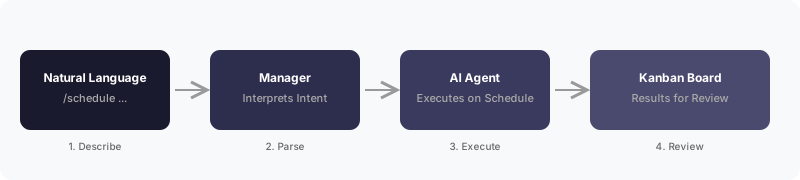
Describe the task
Open Manager and type /schedule followed by what you want. Use plain English with a time reference:
/schedule Every weekday at 9 AM, check all open PRs on GitHub and summarize which need reviewManager creates the automation
Manager interprets the intent, sets the schedule, and confirms with a human-readable summary: task name, frequency, and next run time.
Results land on your Kanban board
Each execution produces a task card. Open it to see the full output. Missed runs (app was closed) are flagged and can be triggered manually.
Iterate by chatting
Need to adjust scope? Tell Manager in natural language. It updates the automation without requiring deletion and recreation.
Five Automation Recipes for Common Dev Tasks
Each recipe below is a copy-paste-ready /schedule prompt. Manager handles interpretation, scheduling, and execution.
1. Daily PR Triage
/schedule Every weekday at 9 AM, check all open GitHub PRs in my project, summarize which are ready for review, and flag any with merge conflictsReplaces the morning ritual of opening GitHub, scanning notifications, and mentally sorting what matters. Manager delivers a prioritized summary before standup.
2. Weekly Dependency Audit
/schedule Every Monday at 10 AM, check for outdated npm dependencies, create a branch with updates, run tests, and report which updates passGoes beyond version bumping. Manager runs the test suite against each update and reports which are safe to merge, reducing manual triage to a single review.
3. Friday Quality Gate
/schedule Every Friday at 5 PM, run the full test suite and linter, then generate a health report with pass rate, new failures, and flaky test candidatesA weekly checkpoint that catches regressions before the weekend. The report waits in the To Review column on Monday morning.
4. Sprint Changelog
/schedule Every other Friday, generate a changelog from all merged PRs since the last changelog, grouped by feature areaEliminates the end-of-sprint scramble to remember what shipped. Manager reads PR titles, descriptions, and labels to produce a structured changelog.
5. Daily Standup Summary
/schedule Every weekday at 6 PM, summarize today's git commits and completed tasks, formatted as a standup updateGenerates status updates from actual work output. Useful for async teams where written standups replace meetings.
Task Decomposition for One-Off Batch Work
Not all repetitive work is scheduled. Sometimes the task is a one-shot batch operation: apply a pattern change across many files, migrate a module, or rename an API surface.
Manager handles this through task decomposition. Describe the outcome, and Manager splits it into subtasks, assigns each to a parallel worker, and tracks completion on the Kanban board.
Update all service files in src/services/ to use the new error handling pattern from src/utils/errors.ts. Replace the old try-catch style in each file.Manager analyzes the affected files, creates a subtask per file (or per logical group), runs workers in parallel, and surfaces results for review. The developer reviews completed work rather than performing the migration file by file.
When This Approach Does Not Fit
Manager automation is not a universal replacement for all automation tooling. Three situations where it falls short:
- App must be running. Scheduled tasks execute only while the Verdent desktop app is active. If the machine is off or the app is closed, the task is marked Missed. For tasks that must run regardless of local state, a server-side CI system remains necessary.
- Infrastructure-level automation. Terraform plans, Kubernetes operators, and cloud deployment pipelines operate at a layer below application code. Manager orchestrates coding tasks, not infrastructure provisioning.
- Strict audit trails. Regulated environments that require signed, immutable CI logs may not accept an AI agent's execution record as a compliance artifact. Traditional CI with artifact signing is still the right tool there.
The practical boundary: if the task requires codebase understanding and produces a reviewable output (a PR, a report, a file change), Manager fits. If it requires always-on infrastructure or compliance-grade audit trails, it does not.
Why Natural-Language Automation Beats Maintaining Scripts
The real cost of repetitive tasks is not the task execution. It is the maintenance of the automation itself: the YAML that drifts, the shell script nobody updates, the CI job that breaks silently after a dependency change.
Natural-language automation eliminates that second-order cost. The "configuration" is a sentence. Changing scope is a follow-up message, not a code review.
| Dimension | Traditional Scripts / CI | Verdent Manager |
|---|---|---|
| Setup | Write YAML or shell, debug config, commit, wait for CI run | Type a sentence in Manager chat |
| Codebase awareness | None unless explicitly scripted | Full project context via AI agents |
| Modification | Edit script, commit, redeploy | Send a follow-up message |
| Scope | Limited to predefined operations | Any task an AI agent can perform with codebase access |
| Failure handling | Alerts; manual investigation | Missed/Failed status on Kanban; manual re-trigger available |
This is not an argument against CI pipelines for deployment, testing gates, or compliance. It is an argument that the category of "small recurring dev tasks" deserves a lighter tool than a full pipeline, and natural language is that tool.