
Claude Skills vs MCP: When CLI+Skills Beats MCP, and When It Doesn't
Why we keep this comparison short
I've written six Claude Skills this season, and I almost never use MCP.
The few MCP servers I keep installed — Figma, Notion, Chrome DevTools — I leave switched off most of the time. The first time I tried to compare GitHub MCP against the gh CLI, gh won so cleanly that I never opened the MCP again.
So this isn't another "claude skills vs mcp" layer-cake explainer. The SERP already has those. This one's written by someone who picked between the two every working day for half a year, on Claude Code, Verdent, and Codex — and has a strong view about which side most coding-agent builders should pick first.
The short version is below. The long version, with two real cases I sat through, is the rest of this article.
The honest one-liner: a Skill is a runbook, an MCP server is a live socket
Most "Claude Skills vs MCP" posts settle on a layer model: Skills sit at the prompt/knowledge layer, MCP sits at the integration layer. That's not wrong. It's just bloodless.
Here's the cut that actually predicts which one you should reach for:
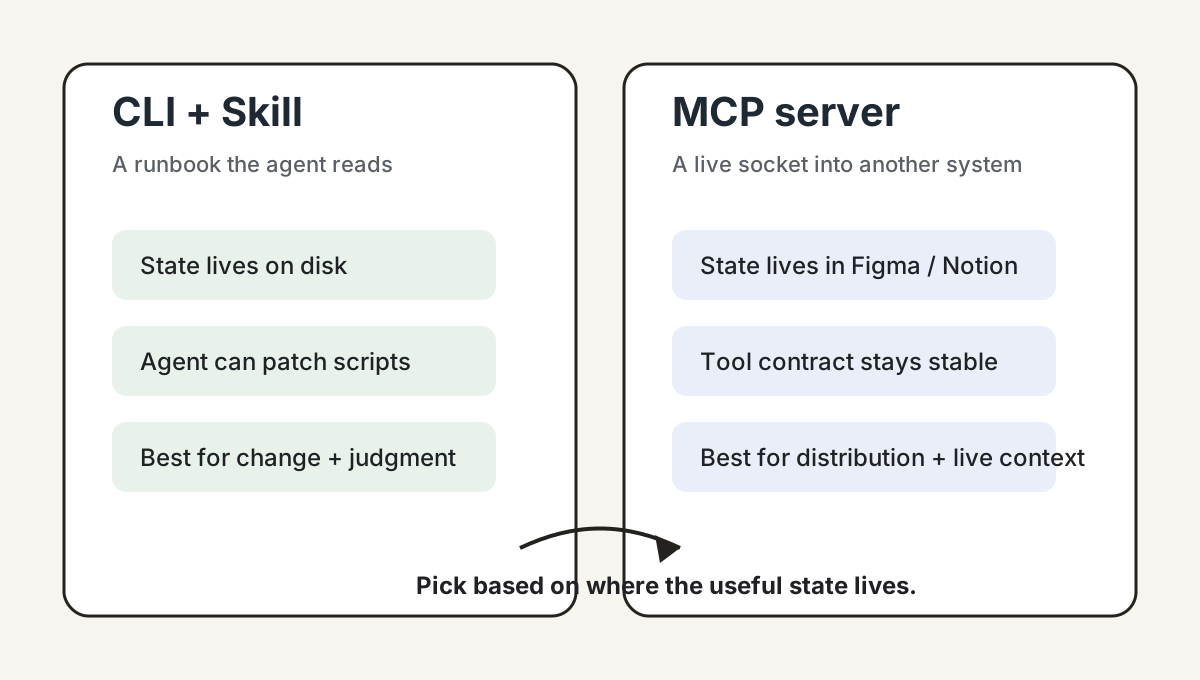
- A Skill is a runbook the agent reads. It encodes how you do something — which scripts to run, in what order, what to check when it fails, which platform quirks matter. The agent loads it as text, decides when to use it, and then runs your actual files. The state lives on your disk.
- An MCP server is a live socket into someone else's running system. It exposes the current state of an external product — the node a designer just selected in Figma, the page a tester is on in Chrome, the rows a teammate just edited in a Notion database — as something the agent can call.
Both are legitimate. They just answer different questions. A Skill tells the agent "how to do X here". An MCP server tells the agent "what is true right now over there".
Once you internalize that, the rest of the choices fall out almost mechanically.
Case 1: why I built transcribe-skill as a Skill, not an MCP server
One of the six Skills is transcribe-skill. Its job is to turn any audio or video source — a YouTube link, a podcast feed, a direct audio URL, a local file — into clean text and SRT, optionally cleaned up using the show's metadata page.
I never seriously considered making it an MCP server. Four reasons, in the order they hit me.
1. Iteration speed. Transcription tools live next to a moving target. Small platforms change their player, YouTube tightens cookies, Bilibili rotates anti-scrape, podcast RSS gets a new edge case, subtitle formats drift. With CLI scripts the agent opens sources.py or audio.py, edits the parser, and reruns. With an MCP server every fix has to flow back through tool contracts, resource URIs, error envelopes, and client compatibility — a 30-minute fix becomes a half-day patch.
2. Skills sediment workflow knowledge better than tools do. The valuable parts of this project aren't API calls. They're judgments: which platforms need cookies, when to fall back, how to clean an interview transcript, when speaker diarization is worth trusting. That kind of contextual knowledge fits a Skill's prose-plus-files shape. Express it through MCP tool schemas and you get a thin layer over a thick book.
3. Self-healing falls out for free. A coding agent can run a script, read the stderr, locate the parser, edit the file, retry, and write the lesson back into the domain notes. That loop is native to a CLI + repo setup. With an MCP server, letting the server modify its own implementation introduces hot-reload, permission, and debugging problems I don't want to own.
4. Local dependencies stay legible. Transcription leans on ffmpeg, yt-dlp, Whisper, cookie jars, temp audio caches, API keys. With CLI calls — python transcribe.py <url> — the agent sees stdout, stderr, file paths, and partial artifacts. MCP wraps all of that into tool results, and the debugging surface narrows just when you need it widest.
What transcribe-skill actually looks like in the repo: a SKILL.md runbook in the middle, with Python primitives hanging off it (transcribe.py, resolve_source.py, download_audio.py). Around that runbook sit two notebooks — domain-skills/ for per-platform parsing notes, interaction-skills/ for output styles like interview transcripts and subtitles. Manual + toolbox + platform notebook + output notebook. None of those four pieces wants to live behind a tool schema.
Case 2: why I do reach for Figma MCP (and what faking it as a Skill would cost)
The job was concrete. A designer selected a Pricing Card frame in Figma and asked me to ship it as a Svelte/React component on our marketing site. The brief: visually faithful, using the existing design tokens, reusing our Button/Card/Input primitives, exporting icon assets, respecting auto-layout spacing.
Figma MCP earned its keep here in a way no Skill could fake. It handed the agent the structured design context off the current selection — frame hierarchy, component nodes, text, color, spacing, auto-layout, variables, asset references. With Code Connect wired up, it also told the agent which Figma component maps to which file in our repo, so the generated code reused our Button, not a freshly invented one.
If I'd tried to do this without MCP, the pain would have stacked up in three layers.
1. The state lives inside Figma. Which node the designer selected, which page is open, which variant a component instance inherits, which token is bound to which variable — that context only exists in the running Figma file. A Skill can teach the agent how to call Figma's REST API; it can't reach into the live editor session without a custom plugin, a local bridge, and an OAuth dance.
2. Figma's semantics need an official channel. Screenshots give you pixels. The REST API gives you a partial JSON. Stitching Dev Mode, variables, component mappings, Code Connect, asset exports, and current selection into something stable means you'd end up rebuilding a Figma connector from scratch. MCP exists precisely to expose these as agent-callable surface area.
3. The feedback loop closes only if both sides talk. With a Skill, the agent generates code; the design stays in Figma; the review collapses to screenshot-vs-build squinting. With MCP, the agent can read tokens, export assets, and — where supported — write back to the canvas, so the loop runs without human stitching.
The honest part: I'm satisfied that MCP made the agent operate on the selected design object rather than a URL or a screenshot. What I'm not satisfied with is the operational tail. Figma MCP still depends on the right seat, the right server (remote vs desktop), and the specific client's beta support; when something breaks, debugging it is harder than reading a Python stderr. A CLI script is opinionated and fragile; an MCP server is opinionated and remote.
The decision matrix I actually use
Two cases isn't a framework. But running through dozens of smaller decisions with the same lens, the same seven splits keep showing up. This is the table I'd give a teammate who's been told to "pick Skills or MCP" and has half an hour to decide.
| Goal | Pick |
|---|---|
| Quickly support a moving set of platforms or sources | CLI + Skill |
| Let the coding agent diagnose and patch its own failures | CLI + Skill |
| Sediment platform-specific gotchas and cleaning rules | Skill |
| Expose the same capability to several clients (Claude Desktop, Cursor, Verdent, internal agents) | MCP |
| Ship something as a long-lived, versioned service | MCP |
| Stand up a standardized tool API across a team | MCP |
| Reach non-coding agents (chat copilots, browser extensions, no-shell environments) | MCP |
Two patterns under the table. The Skill column is heavy on change and judgment — anything where you expect to keep modifying the implementation, or where the value is in encoded experience. The MCP column is heavy on distribution and contract — anything where multiple consumers, long-term stability, or a non-coder caller is in the picture.
If the row you care about isn't here, that itself is a signal. It probably means the question is really about something else — a missing CLI, an unclear ownership boundary, or a host limitation — and the Skill-or-MCP framing isn't going to settle it.
A Skill gotcha that's nowhere in the docs: description is a classifier prompt
One thing the SKILL.md reference pages do not spell out: the description field is not marketplace copy. It's a lightweight classifier prompt. The agent reads it to decide whether to load this Skill at all, and the wording of that one paragraph is what triggers — or fails to trigger — your runbook.
The first time I wrote a description, I made the mistake almost everyone makes. I described the Skill the way you'd pitch a product feature: "transcribe, summarize, clean, content rewrite, video download…". The model started reaching for it on adjacent tasks where it had no business — anything that smelled like "text" or "video" pulled it in.
The fix wasn't writing more. It was writing narrower, in a different shape entirely. I rewrote the description as "trigger when X / do not trigger when Y" — explicit positive and negative conditions. The mistriggers stopped almost immediately, and the relevant ones got more reliable.
If you've shipped a Skill that "feels flaky" or "fires when it shouldn't", check the description before you touch the runbook. Treat it as the conditional you're handing the agent, not as the README header.
My rule of thumb (and where it stops working)
So here's how I'd compress everything above into one sentence I actually use:
If you're building a coding agent, build everything you can as CLI + Skill first. Reach for MCP only for the things that genuinely live inside someone else's running system — Figma, Notion, Chrome, your design tool of the day. Don't do it the other way around.
That's the working rule. It comes out of six Skills, three hosts (Claude Code, Verdent, Codex), and a handful of MCP servers I've actually used in anger.
It doesn't generalize everywhere, and the honest version of this article has to say where.
- If you're publishing an MCP server for a multi-client audience, this rule isn't yours. I haven't shipped one to a registry. The questions you'll face — transport choices, client compatibility, versioning, distribution — are the questions MCP was actually designed for, and you'll learn more from people doing it than from me.
- If your agent runs on Claude Desktop or only through the bare Agent SDK, my Skill experience may not transfer cleanly. I run Skills on Claude Code, Verdent, and Codex; the host shapes what a Skill feels like in ways I can't speak to firsthand for the others.
- If you're plugging this into an enterprise distribution story — pushing capabilities to non-engineers across teams — MCP starts winning rows that don't appear in my matrix. Standardized contracts, audit, and centralized control are real advantages I haven't had to optimize for.
If you're shipping a coding agent, write the Skills first.